

Using wrong social media image sizes can reduce reach and engagement. Here is the updated 2026 guide for Instagram, Facebook, LinkedIn, X and TikTok image dimensions.
Introduction
At nxc.creative, we regularly see brands struggle with one simple but serious issue. They design a post that looks perfect in their editing tool. But once uploaded, it appears cropped, blurry, or stretched. Important text gets cut off. Logos are not aligned. The design loses its impact.
Social media image sizes change frequently. Platforms update layouts. Feeds prioritize different formats. Mobile display differs from desktop. This complete 2026 guide by NXC.Creative will help you publish optimized, professional content across all major platforms.
Why Getting Social Media Image Sizes Right Is Important
Social media is visual first. Before anyone reads your caption, they notice your image.
When dimensions are incorrect:
Logos get cropped
Headlines get hidden behind interface elements
Compression reduces quality
The post looks unprofessional
Engagement drops
At NXC.Creative, we treat sizing as a core part of professional social media management. Optimized visuals improve trust, clarity, brand perception, and performance. If your visuals look sharp and properly aligned, your brand automatically feels more credible.
Quick Social Media Image Sizes 2026
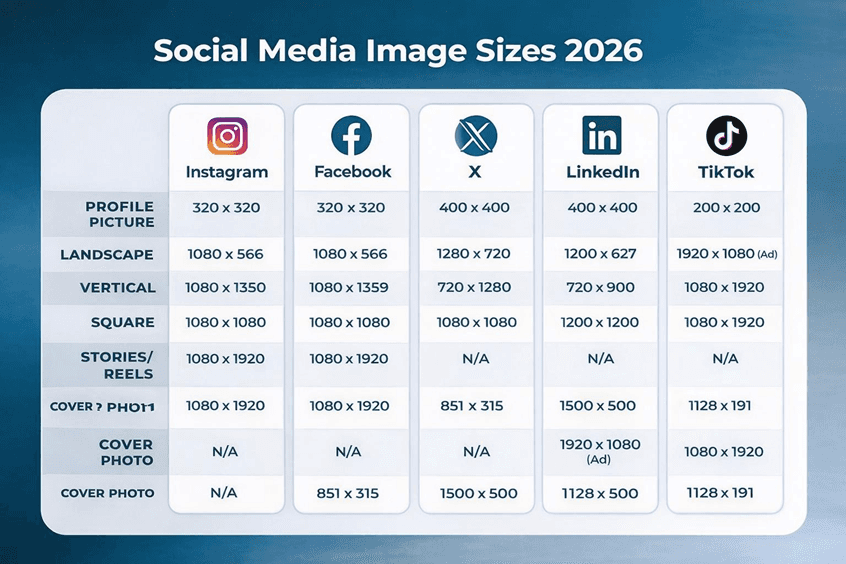
Below are the updated and most searched image dimensions for 2026.
Instagram Image Sizes 2026
Instagram supports landscape, square, and vertical posts. However, the platform clearly favors vertical content because it fills more screen space.
Instagram Profile Picture
• 320 x 320 pixels
Displayed as a circle. Keep your logo or face centered.
Instagram Feed Post Sizes
• Landscape: 1080 x 566 pixels
• Vertical: 1080 x 1350 pixels
• Square: 1080 x 1080 pixels
Recommended width: 1080 pixels.
We recommend using the vertical 1080 x 1350 format whenever possible. It occupies more feed space and improves visibility.
Instagram Stories and Reels
• 1080 x 1920 pixels
Aspect ratio: 9:16
Important: Keep key text and logos away from the top and bottom edges. Instagram overlays icons in these areas.
Facebook Image Sizes 2026
Facebook still works strongly for service businesses and local brands.
Facebook Profile Picture
• 320 x 320 pixels
Upload high resolution because display size changes across devices.
Facebook Cover Photo
• 851 x 315 pixels
Keep important elements centered because mobile cropping differs from desktop.
Facebook Feed Post Sizes
• Landscape: 1080 x 566 pixels
• Vertical: 1080 x 1359 pixels
• Square: 1080 x 1080 pixels
From our experience at NXC.Creative, vertical posts tend to perform better due to mobile browsing behavior.
Facebook Stories
• 1080 x 1920 pixels
X Image Sizes 2026
X continues to support strong landscape visuals.
Profile Picture
• 400 x 400 pixels
Header Image
• 1500 x 500 pixels
Keep text centered because slight cropping can happen depending on screen size.
In-Stream Post Sizes
• Landscape: 1280 x 720 pixels
• Vertical: 720 x 1280 pixels
• Square: 1080 x 1080 pixels
The safest aspect ratios are 16:9 and 1:1.
We guide brands to design with safe margins to avoid unexpected cropping.
LinkedIn Image Sizes 2026
LinkedIn is critical for B2B marketing and professional branding.
Personal Profile
• Profile picture: 400 x 400 pixels
• Cover image: 1584 x 396 pixels
Company Page
• Logo: 400 x 400 pixels
• Cover image: 1128 x 191 pixels
LinkedIn Feed Post Sizes
• Landscape: 1200 x 627 pixels
• Vertical: 720 x 900 pixels
• Square: 1200 x 1200 pixels
For link preview posts, 1200 x 627 pixels performs best.
We ensure LinkedIn visuals are clean, aligned, and professional because credibility matters most on this platform.
TikTok Image Sizes 2026
TikTok is fully mobile first.
Profile Picture
• 200 x 200 pixels
Vertical Video
• 1080 x 1920 pixels
Aspect ratio: 9:16
Ad Formats
• Landscape: 1920 x 1080 pixels
• Square: 640 x 640 pixels
• Vertical: 1080 x 1920 pixels
We prioritize vertical full screen design for maximum impact and retention.
Common Mistakes Brands Make
Many businesses repeatedly make these errors:
Using one image size for all platforms
Placing text too close to edges
Uploading low resolution graphics
Ignoring safe zones in Stories
Not optimizing for mobile first viewing
Professional social media management means building structured templates for square, vertical, and story formats.
How NXC.Creative Standardizes Image Sizes
For our clients, we create three master design formats:
• Square 1080 x 1080
• Vertical 1080 x 1350
• Story 1080 x 1920
These templates reduce resizing time, eliminate errors, and maintain brand consistency across Instagram, Facebook, LinkedIn, X, and TikTok.
This structured system saves time and improves results.
Frequently Asked Questions
Question: What is the most universal image width in 2026
Answer: 1080 pixels remains the most common width across platforms.
Question: Do vertical images perform better
Answer: Yes. Vertical content fills more screen space on mobile and usually generates higher engagement.
Question: What happens if you upload the wrong size
Answer: The platform compresses or crops your image. Important information may be lost.
Key Takeaways
1080 pixel width remains the universal standard.
Vertical formats like 4:5 and 9:16 perform better in mobile feeds.
Always keep important content inside safe zones.
Create master templates for square, vertical, and story formats.
Review platform specifications at least once per year.
Final Thoughts
Social media image sizes are not just technical details. They directly influence how professional your brand appears online. Clear, optimized visuals build trust.
Cropped or blurry posts reduce credibility. If your business wants consistent growth across Instagram, Facebook, LinkedIn, X, and TikTok, optimized image sizing must be part of your strategy.
At NXC.Creative, we help brands manage content, design systems, and platform optimization to ensure every post is sharp, aligned, and performance focused.
